What this PAYE calculator does
This PAYE calculator works out the Income Tax, National Insurance and student loan deductions on a single payslip for the 2026/27 tax year (6 April 2026 to 5 April 2027). Enter your gross pay, how often you’re paid, which payslip of the year it is and your tax code, and it shows your take-home pay with the full working behind the tax figure.
PAYE stands for Pay As You Earn. It’s the system your employer uses to take tax and National Insurance from your wages before you’re paid. Unlike a yearly salary calculator, this tool copies the way payroll software actually works, period by period. That makes it useful for checking a real payslip, understanding an emergency tax code or seeing why your tax changed from one month to the next.
How to use the PAYE calculator
- Enter your gross pay for this payslip. Use the total before deductions, including any overtime or bonus paid on it.
- Choose how often you’re paid. Monthly, weekly, every 2 weeks or every 4 weeks.
- Enter the payslip number. The tax year starts on 6 April, so a payment between 6 April and 5 May is month 1, and a payment between 6 October and 5 November is month 7. For weekly pay, your first payslip after 6 April is week 1.
- Type your tax code exactly as it appears on your payslip. For example 1257L, S1257L, C1257L, K475, BR, D0 or 1257L M1. The calculator spots emergency codes ending in W1, M1 or X automatically.
- Add your pay and tax to date (optional). These are on your last payslip, often labelled “Taxable pay TD” and “Tax paid TD”. If you leave them blank, the calculator assumes you were paid the same amount every period since April.
- Add your NI category letter, pension and student loan if they apply, then press Calculate.
How the PAYE calculator works out your tax
Most tax codes are cumulative. In other words, payroll doesn’t look at this month’s pay on its own. Instead, it looks at everything you’ve been paid since 6 April and works out the tax due on that total. Then it takes away the tax you’ve already paid. The formula is:
Tax this payslip = tax due on (pay to date − tax-free pay to date) − tax already paid
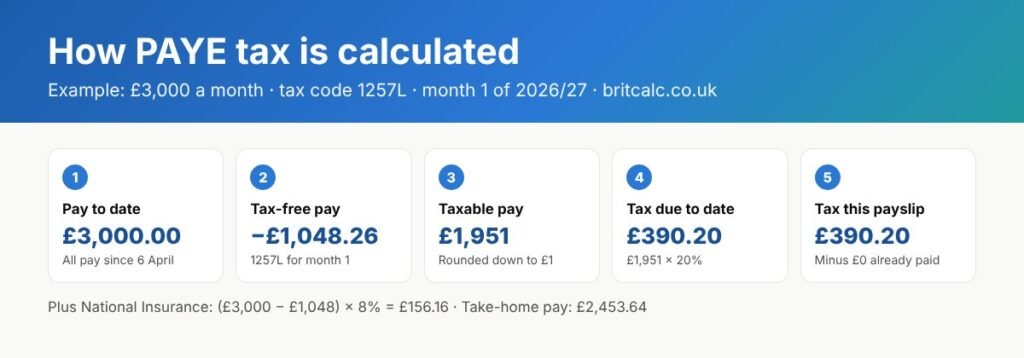
Here’s what each part means:
- Pay to date: all your taxable pay since 6 April, including this payslip. Salary sacrifice and net pay pension contributions come off first.
- Tax-free pay to date: your tax code’s allowance for the year so far. For 1257L it’s £1,048.26 for each month or £241.92 for each week. HMRC’s tables split codes over 500 into blocks of 500, which is why the figure is a penny above £12,570 ÷ 12.
- Rounding: payroll rounds the taxable pay down to the nearest whole pound before working out the tax.
- Tax bands to date: the tax bands are shared out across the year too. By month 1 you get one-twelfth of the £37,700 basic rate band (£3,141.67), by month 2 two-twelfths, and so on.
- Tax already paid: the total Income Tax taken on earlier payslips this tax year.
This is the method set out in HMRC’s payroll technical specifications for Income Tax, which payroll software developers follow. If you have an emergency code, the same steps are used but only for this payslip, as if it were month 1 or week 1.
PAYE calculator worked examples
£3,000 a month on tax code 1257L
| Step | Working | Amount |
|---|---|---|
| Gross pay (month 1) | £3,000.00 | |
| Tax-free pay | 1257L for month 1 | £1,048.26 |
| Taxable pay | £3,000 − £1,048.26 = £1,951.74, rounded down | £1,951.00 |
| Income Tax | £1,951 × 20% | £390.20 |
| National Insurance | (£3,000 − £1,048) × 8% | £156.16 |
| Take-home pay | £2,453.64 |
If your pay stays the same, your tax switches between £390.20 and £390.40 from month to month. That’s simply the rounding down to whole pounds. Across the full year it adds up to £4,684.00, which is the same as 20% of (£36,000 − £12,579.12) rounded down.
Starting a new job in October
Say you had no job between April and early October, and you start on £3,000 a month in month 7. On the normal cumulative code, your tax-free pay to date is already £7,337.82 (7 × £1,048.26). As a result, you pay no tax in months 7, 8 and 9, then £303.40 in month 10 and about £390 after that. That adds up to £1,084.00 for the six months.
If your new employer puts you on the emergency code 1257L M1 instead, you’d pay £390.20 every month, or £2,341.20 over the same six months. That’s £1,257.20 more. You’d get it back later, either through a new tax code or a refund after the end of the tax year.
K code: K475 on £2,500 a month
A K code adds to your taxable pay instead of giving you a tax-free amount. K475 adds £396.59 a month, so taxable pay is £2,500 + £396.59 = £2,896.59, rounded down to £2,896. The tax is £2,896 × 20% = £579.20. That’s well under the limit, since tax can’t be more than half your pay (£1,250).
Scottish taxpayer: S1257L on £3,000 a month
Scottish rates use more bands, so the tax is £392.27 instead of £390.20. On £1,951 of taxable pay, month 1 gives 19% on the first £330.58, 20% on the next £1,082.42 and 21% on the last £538 (Scottish Government: 2026 to 2027 rates). National Insurance is the same as in the rest of the UK.
£500 a week on 1257L
Weekly tax-free pay is £241.92. So taxable pay is £258.08, rounded down to £258, and the tax is £51.60. National Insurance is (£500 − £242) × 8% = £20.64, leaving £427.76 take-home.
PAYE calculator rates and thresholds for 2026/27
Income Tax bands used by payroll
| Band (England, Wales, NI) | Taxable pay a year | Monthly (month 1) | Weekly (week 1) | Rate |
|---|---|---|---|---|
| Basic rate | £0 – £37,700 | £3,141.67 | £725.00 | 20% |
| Higher rate | £37,701 – £125,140 | up to £10,428.33 | up to £2,406.54 | 40% |
| Additional rate | Over £125,140 | above £10,428.33 | above £2,406.54 | 45% |
These are bands of taxable pay, after your tax-free pay has come off. Welsh taxpayers (C codes) currently pay the same rates. Scottish taxpayers (S codes) use the Scottish bands below.
| Scottish band | Taxable pay a year | Rate |
|---|---|---|
| Starter | £0 – £3,967 | 19% |
| Basic | £3,968 – £16,956 | 20% |
| Intermediate | £16,957 – £31,092 | 21% |
| Higher | £31,093 – £62,430 | 42% |
| Advanced | £62,431 – £125,140 | 45% |
| Top | Over £125,140 | 48% |
National Insurance and student loan thresholds per payslip
| Threshold | Monthly | Weekly | Rate |
|---|---|---|---|
| NI Primary Threshold | £1,048 | £242 | 8% above |
| NI Upper Earnings Limit | £4,189 | £967 | 2% above |
| Student loan Plan 1 | £2,241.66 | £517.30 | 9% above |
| Student loan Plan 2 | £2,448.75 | £565.09 | 9% above |
| Student loan Plan 4 | £2,816.25 | £649.90 | 9% above |
| Student loan Plan 5 | £2,083.33 | £480.76 | 9% above |
| Postgraduate Loan | £1,750.00 | £403.84 | 6% above |
Sources: HMRC rates and thresholds for employers 2026 to 2027 and collection of student loans from 6 April 2026. Student loan deductions are rounded down to the nearest pound. Unlike tax, they aren’t cumulative, so each payslip stands on its own.
Tax codes explained
Your tax code tells your employer how much tax-free pay to give you. The number is your allowance with the last digit removed, so 1257 means £12,570. The letters mean (GOV.UK: what your tax code means):
| Code or letter | What it means |
|---|---|
| L | You get the standard tax-free Personal Allowance |
| M | You’ve received 10% of your partner’s Personal Allowance (Marriage Allowance) |
| N | You’ve transferred 10% of your Personal Allowance to your partner |
| T | Your code includes other calculations to work out your allowance |
| K | You have untaxed income or benefits worth more than your allowance |
| 0T | No tax-free allowance, so all pay is taxed |
| BR | All pay from this job is taxed at 20%, usually a second job |
| D0 / D1 | All pay taxed at 40% or 45%, usually a second job |
| NT | No tax taken from this pay |
| S or C at the start | Scottish or Welsh rates apply |
| W1, M1 or X at the end | Emergency code: tax worked out on this payslip only |
One thing to know: the PAYE calculator doesn’t reduce your allowance once you earn over £100,000. Payroll never does that by itself. Instead, HMRC changes your tax code (often to a lower number or a K code), so enter the code on your payslip and the tax will follow from it.
Emergency tax codes and getting tax back
If your code ends in W1, M1 or X, you’re on an emergency code. Your employer works out tax on each payslip as if it were the first of the year, ignoring what you earned and paid before (GOV.UK: emergency tax codes). This often happens when you start a new job without a P45. Usually HMRC sends a new code within a few weeks.
Because each payslip is taxed on its own, an emergency code can’t give you back any tax-free pay you missed earlier in the year. However, once your employer switches you back to a cumulative code, the calculation looks at the whole year again, and any overpaid tax usually comes back as a refund on your next payslip. To see what that refund might be, choose your normal code and enter your pay and tax to date.
K codes and the 50% limit
With a K code, your employer adds an amount to your pay before working out the tax. However, the tax taken on any payslip can’t be more than half your pay before tax (GOV.UK: K in your tax code). If the K code would mean more than that, your employer takes 50% and the rest carries forward to later payslips. The PAYE calculator applies this limit and tells you when it kicks in.
Pensions on your payslip
How your pension is taken changes your tax and National Insurance, so choose the type your employer uses:
- Salary sacrifice: your pay is reduced before tax and NI, so you save both. On £3,000 a month with 5% sacrificed, tax falls to £360.20 and NI to £144.16.
- Net pay arrangement: the contribution comes off before tax but not before NI. With the same 5%, tax is £360.20 but NI stays at £156.16.
- Relief at source: the contribution is taken from your pay after tax, and the pension provider claims 20% back from HMRC. So for a £150 contribution, £120 comes off your pay and your tax doesn’t change.
In this example, net pay and relief at source both leave you with £2,333.64, but salary sacrifice leaves £2,345.64 because you also save National Insurance.
Why your payslip might not match the PAYE calculator
- Rounding: payroll software can differ from these figures by a penny or two, which HMRC accepts.
- Different pay earlier in the year: if your pay changed, enter your actual pay and tax to date rather than relying on the assumption of equal pay.
- Benefits in kind: a company car or medical insurance taxed through payroll increases your taxable pay. This calculator doesn’t include them.
- Week 53: if you’re paid weekly and get 53 pay days in the year, the last one is taxed on a week 1 basis.
- Other deductions: things like union fees, charity giving or court orders aren’t included.
Common mistakes when using a PAYE calculator
- Using the wrong payslip number. April is month 1, not January. A payslip paid on 25 December is month 9.
- Missing the S or C. If your code starts with S, you pay Scottish rates, so include the letter.
- Entering yearly salary. This tool works on one payslip at a time. For a yearly figure, use the UK Salary Calculator.
- Mixing up pension types. Salary sacrifice and relief at source give quite different payslips, so check your contract or ask HR.
- Expecting the same tax every month. Small changes of 20p are normal, because of rounding.
Who should use this PAYE calculator?
It’s designed for employees who want to check a payslip, people starting a new job on an emergency code, and anyone with a K, BR or D0 code who wants to see how it works. It’s also handy for small employers who run their own payroll and want a second check.
It isn’t the right tool for the self-employed, company directors paying themselves through an annual NI earnings period, or anyone with several jobs who wants one combined figure. For a yearly overview, try the UK Income Tax Calculator instead.
Tips for accurate PAYE calculator results
- Copy the tax code letter for letter, including any S, C, K, W1, M1 or X.
- If your pay changes from month to month, open “Pay and tax to date” and enter the totals from your previous payslip.
- Check your NI category letter on your payslip. Most people are A.
- Compare your code with HMRC’s record using the Check your Income Tax for the current year service.
Frequently asked questions
How is PAYE tax calculated each month?
Payroll adds up your pay since 6 April, takes off the tax-free pay your tax code allows for the year so far, rounds down to the nearest pound and works out the tax due to date. It then subtracts the tax you have already paid. What is left is the tax on this payslip.
How much tax do I pay on £3,000 a month?
On tax code 1257L in England, Wales or Northern Ireland, the tax is £390.20 in month 1 (sometimes £390.40 later in the year because of rounding), plus £156.16 National Insurance. That leaves £2,453.64 take-home before any pension or student loan.
What does M1 or W1 mean on my tax code?
It means an emergency, non-cumulative code. Tax is worked out on each payslip on its own, as if it were the first month or week of the tax year, so any unused tax-free pay from earlier in the year is not given back until your code is corrected.
Why has my tax gone down or up this month?
Common reasons are a change in pay, a new tax code, a refund from a corrected code, or simply rounding, which can move tax by about 20p a month even when pay stays the same.
Can my employer take more than half my pay in tax?
No. Under the overriding limit, Income Tax on a payslip cannot be more than 50% of your pay for that period. Any extra tax carries forward to later payslips.
Does the PAYE calculator work for Scotland and Wales?
Yes. Enter a code starting with S for Scottish rates or C for Welsh rates. National Insurance and student loans are the same across the UK.
Is take-home pay the same as net pay?
Yes. Both mean the amount paid into your bank account after Income Tax, National Insurance, student loan and pension deductions.
Final thoughts
PAYE can look confusing because the tax on each payslip depends on everything you’ve been paid since April, not just this month. However, once you see the working, it’s simple: tax-free pay to date, taxable pay to date, tax due to date, minus tax already paid. Use the PAYE calculator above to check your own payslip, and if something still doesn’t add up, ask your payroll team or HMRC.
Other calculators you might find useful: the National Insurance Calculator, the UK Income Tax Calculator, the UK Salary Calculator, the Scottish Income Tax Calculator and the Student Loan Repayment Calculator.
Sources: HMRC payroll technical specifications: Income Tax; Rates and thresholds for employers 2026 to 2027; Collection of student loans from 6 April 2026; Scottish Income Tax rates 2026 to 2027; GOV.UK tax codes.
These figures are estimates using 2026/27 rates and the assumptions above. They’re not tax advice, so for anything important, check GOV.UK, your payroll team or an accountant.